How to Design AI Answers People Can Trust
Lead with a one-sentence answer, prove it with the chart, name the source, and show that the AI checked. Lessons from designing an AI finance canvas.
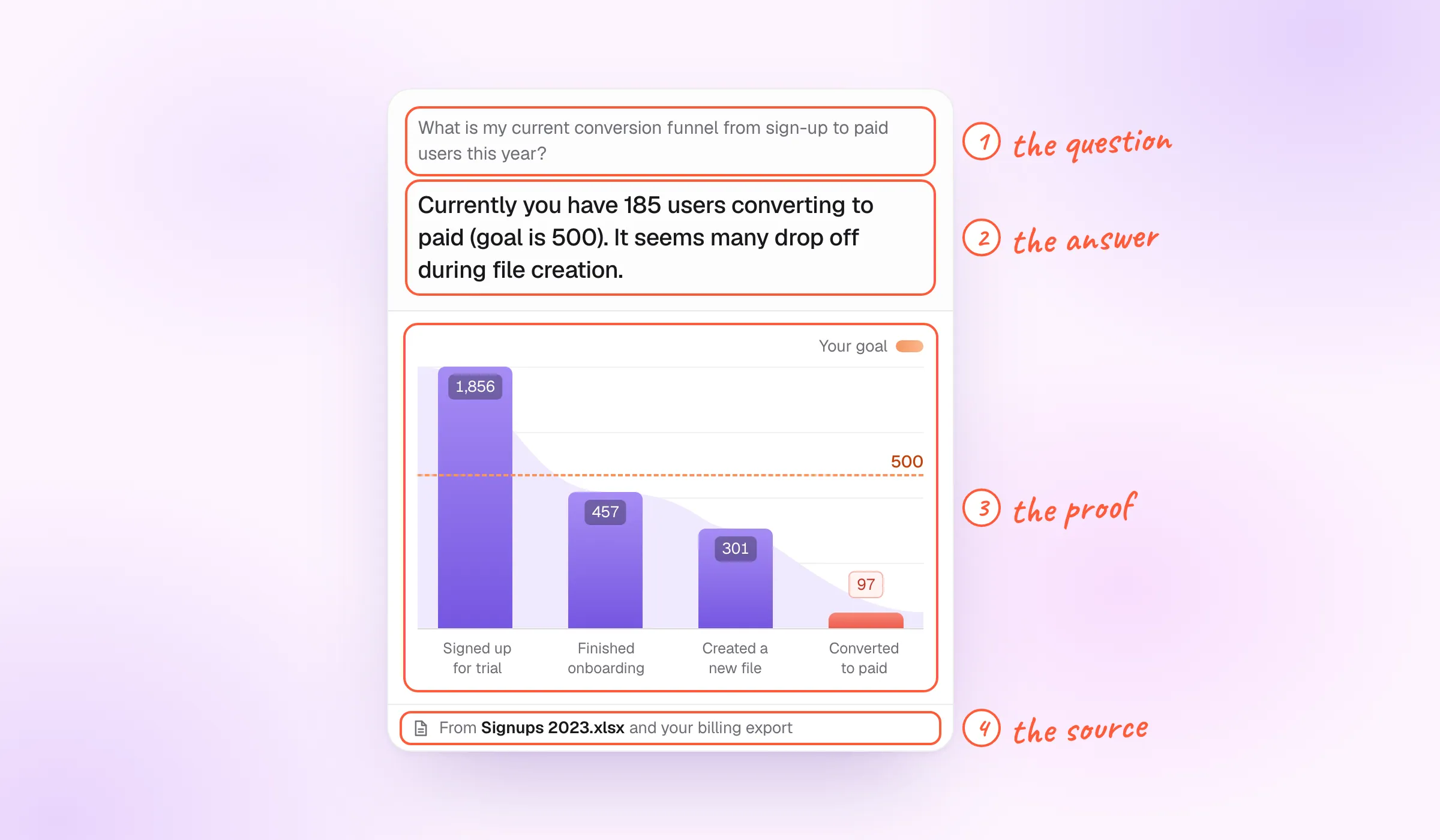
People trust an AI answer when they can check it. On every answer, that means four things in view: the question as the AI understood it, the answer in one sentence, the chart that backs it up, and where the numbers came from. Then one more: proof that the AI actually checked them.
I learned this designing lynq.ai, where I joined as an early designer and helped take the product from 0 to 1. Founders used it to ask questions about their own financial data. Here is what we built, what we tried on the way, and what I would tell a founder building AI answers today.
What was lynq.ai?
lynq.ai let founders bring in everything that held their numbers: Google Drive folders, Excel sheets, their accounting software. Then they could ask questions about it in plain words.
The questions were about the finance side of the business. What was our revenue this month? When did it drop the most? When did we spend the most? Which trends should we watch? Where is the funnel leaking?
It worked like a canvas. You asked in a chat, the way you would in ChatGPT, and it built the answer onto a canvas of reports. Each report was a box, and each box was a chart.
- Drive folder Finance
- Revenue 2023.xlsx Spreadsheet
- Accounting Connected
Finance overview
Conversion funnel, sign-up to paid
185 users convert to paid. The goal is 500.
Why does the answer come before the chart?
Because people scan answers, not questions. On each card the question sits at the top in small grey type. It matters, but people already know what they asked. What they want is the answer, so the answer gets the larger type, right below it, in one sentence.
Take the funnel card. The question asks about the conversion funnel from sign-up to paid this year. The answer says it straight: 185 users converted to paid against a goal of 500, and many drop off while creating a file. Only then comes the chart, with the goal drawn across it.
What is my current conversion funnel from sign-up to paid users this year?
Currently you have 185 users converting to paid (goal is 500). It seems many drop off during file creation.
Your goal
this first
When the sentence is enough, you stop reading there. When you doubt it, the chart is right under it. Someone going through ten reports can read the answers like a list.
What makes an AI answer trustworthy?
No single element earns trust. It comes from several touch points, and each one answers a different doubt:
- The question. How was it asked, and how did the AI read it? If it misread the question, a correct-looking answer is still wrong.
- The answer. One sentence, with the number in it.
- The result. The chart or table behind the number, so you can see it for yourself.
- The source. Where the information came from: which file, which account.
What is my current conversion funnel from sign-up to paid users this year?
Currently you have 185 users converting to paid (goal is 500). It seems many drop off during file creation.
Your goal
Models keep getting better, but these four still do the work. Each one gives the reader a place to stop and check, instead of taking the whole thing on faith.
Did the AI actually check the numbers?
This is the doubt the four touch points don’t settle. AI can give a general answer that sounds specific. You ask, “But did you check it?”, and it replies, “Actually, no, not really.” That still happens with the latest models, unless you force them.
So build the check into the product instead of hoping for it:
- An anchor the AI always goes through. A rule it follows on every report, whether that is a skill, a memory item or a fixed instruction: recheck each number against the source before answering.
- Say whether it did. The answer states it plainly, for example “I checked each number before generating this report”, or says that it did not.
- Mark what can be trusted. Show which numbers come straight from the data and which are estimates, so people know where to look twice.
A forecast is the clearest case. On the growth card, the line is drawn up to today, and everything after it is grey and labelled Forecast. You always know where the data ends and the estimate begins.
What’s my MAU forecast? How likely are we to hit our growth goal of 800 users by Q3?
Grow weekly active users 15% to hit the goal. At this pace you miss it by 207 users.
Monthly active users
Your goal
Chat, document or canvas?
We didn’t start with cards. We went through four versions:
- Chat only. You ask, it answers in text.
- Chat with charts. The same, with a chart under the reply.
- A document builder. The answers put together into a report.
- A canvas. You drop in boxes, and each box is a chart you generate with a question.
-
1Chat
-
2Chat + chart
-
3Document
-
4Canvas
shipped
The canvas is what shipped, mostly because the people who work with those spreadsheets and reports felt more at home with it than with a chat or a document. Each answer became its own box, and the panel beside it lets you change how the chart reads: its type, size and colours, the goal line, grid lines and gradients. The AI makes the first version. You decide how it should look.
AI is a tool, not the answer
The one rule I’d give a founder: treat AI as a partner, not the holy grail.
AI is good at offering options. It sees the past really well, and it can sketch a few paths for where you might go next. Sometimes it gives good guidance. But you still need people who have been through it, who have seen the different cases and scenarios, to use it as a tool and judge what it gives back.
I’ve been in meetings where leadership took every model update too seriously, excited about each little release like small kids in a candy shop. That breaks things. Breaking things is good when you break something old that no longer works. Breaking them for a 0.01 improvement gives you very little.
For AI answers, it means the same as the rest of this article. Keep the person in charge: show what the AI did, where it got it and whether it checked, and let them decide.
A checklist for every AI answer
- Show the question as the AI understood it.
- Lead with the answer in one sentence, with the number in it.
- Put the chart or table that proves it right below.
- Name the source: the file or the account.
- Make the AI recheck every number, and say that it did.
- Mark estimates and forecasts apart from the data.
- Let people change the chart. The AI’s version is a first draft.