We Were Wrong About Workflow Builders
Most people want the result, not the workflow. What three years designing Lantern’s AI workflow builder taught me about templates, chat and trust.
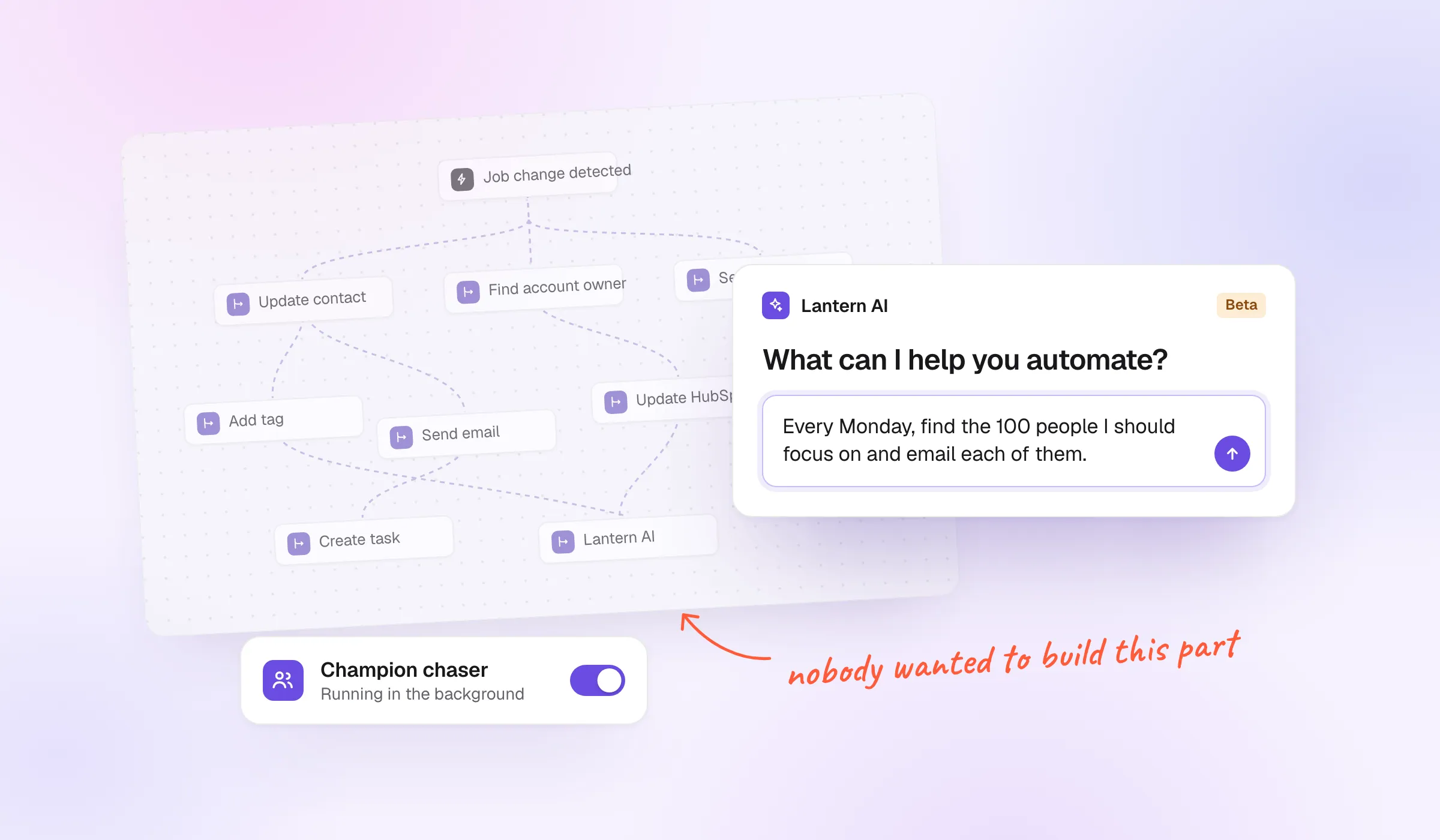
Most people don’t want to build workflows. They want the result.
I learned this the hard way. From late 2022 to the summer of 2025, I was the founding designer of Lantern, an AI CRM built around a visual workflow builder. I redesigned that builder more times than I can count, and we added templates to make it easier. Then our usage data showed what customers actually did: they switched on a few templates, maybe left a short instruction and stopped logging in.
What works is simpler. A chat where you say what you want, the AI asks a few questions and builds the workflow for you, and a short view of the steps so you can see it understood.
What was Lantern’s workflow builder?
Lantern watched for the signals that matter to a sales team, like a champion changing jobs or an account showing buying intent. Each signal could start a workflow: a chain of steps that runs on its own. Update HubSpot or Salesforce, create a task, post in Slack, send an email, or hand the work to Lantern AI.
I designed the builder end to end: triggers, conditions and branches, steps that fold into groups, AI steps, even AI phone calls. Then the states nobody demos, like a step marked Not configured or a Slack message capped at five channels.
It looked great. In the sales room it got the reaction every founder wants: this is so smart, this is so cool. That turned out to be part of the problem.
Who actually builds workflows?
After three years, I think there are three kinds of people in front of a workflow tool:
- The builder. Technical, happy to wire every step by hand. A tiny group. My guess is around 0.1% of users.
- The describer. Knows roughly what should happen but doesn’t want the learning curve. They want to describe it in a chat and watch the workflow build next to it.
- The one who switches it on. Connects their tools, gets on with their day and wants to hear when something turns up: “We found this. Want it as a spreadsheet?”
-
The builder
Wires every step by hand.
My guess: 0.1%
-
Email new champions every Monday
Every Monday Find new champions Send an emailThe describer
Says what should happen and watches it build.
- most peopleChampion chaser We found 12 new champions. Want them as a spreadsheet?
The one who switches it on
Turns it on and waits to hear what it found.
The third kind is the most common. Salespeople have targets to hit and no time to learn another tool. What they want sounds like this: give me the 100 people I should focus on, write each of them an email, and send it.
Even at Lantern, most customer workflows weren’t built by customers. Our own salespeople set them up and sold the automations. To be honest, they didn’t understand the builder much better. They knew what each step should do, and they set up the templates.
Why didn’t templates fix it?
We built templates for two reasons. We thought customers would set up workflows themselves, and we wanted to make that easier. The templates were grouped by agent, like churn risk, expansion and job changes, and a whole group could be created in one click.
On paper it helped. In practice people didn’t want to get into workflows at all. They logged in, clicked enable, enable, enable, maybe left a short instruction on each, and wanted the results and reports by email.
-
Churn risk agent
EnableChurn risk identification
Spot accounts at risk before they leave.
-
Expansion agent
EnableAccount growth analyzer
Find upsell chances in your customers.
Note Only accounts over $50k
-
Job change agent
EnableChampion has departed
Act when a champion leaves a customer.
- 3 champions changed jobs
- 2 accounts show buying intent
- 1 account is at churn risk
A template takes away the blank canvas. It doesn’t take away the workflow. You still have to understand it to change it or fix it, and that is the part people wanted to skip.
What did the usage data show?
We watched how people used Lantern in our analytics, and the pattern was hard to miss: people weren’t logging in. The agents ran in the background, and customers were happy to leave it that way. The attitude was simple: it’s working, I don’t care about the rest.
That is the gap between the sales room and real life. A visual workflow looks smart in a demo. After the sale, nobody wants to deal with the tech itself. They bought the output.
What replaced building by hand?
A chat. We shipped one where you don’t pick steps at all. You tell it what you want, the AI asks follow-up questions, like whether it should also do this or that, and from your answers it builds and sets up the workflow as a draft.
Lantern AI
What can I help you automate?
Every Monday, find the 100 people I should focus on and email each of them.
Who should the emails come from? And should I skip anyone who got one this month?
From me, and skip them. Tell me in Slack too.
Done. It’s saved as a draft, ready when you are.
Reply to Lantern AI
New workflow Draft
- Every Monday at 9:00
- Find the 100 people to focus on
- Skip anyone emailed this month
- Write an email for each
- Send it from your inbox
- Tell you in Slack
It works the way a good colleague takes a brief. You explain the goal, they ask what they need to know, and they come back with the plan. Nobody has to know what a trigger or a branch is.
Why show the steps at all?
Because seeing them is how you trust it. When the AI shows the steps it set up, even in a short form, it answers the question everyone has after typing a request: did it understand me, and does it know what needs to happen?
- Every Monday at 9:00
- Find the 100 people to focus on
- If someone already got an email this month skip them
-
Write an email for each
Send it from your inbox
Email each of them 2 steps
- Tell you in Slack
So the steps stay, but they stop being the place where you work. They become the place where you check. That is where the old builder work still pays off: conditions that read like sentences, groups that fold into one card, a summary that lists the whole workflow in a few lines. We made those for building. They work even better for reading what the AI built.
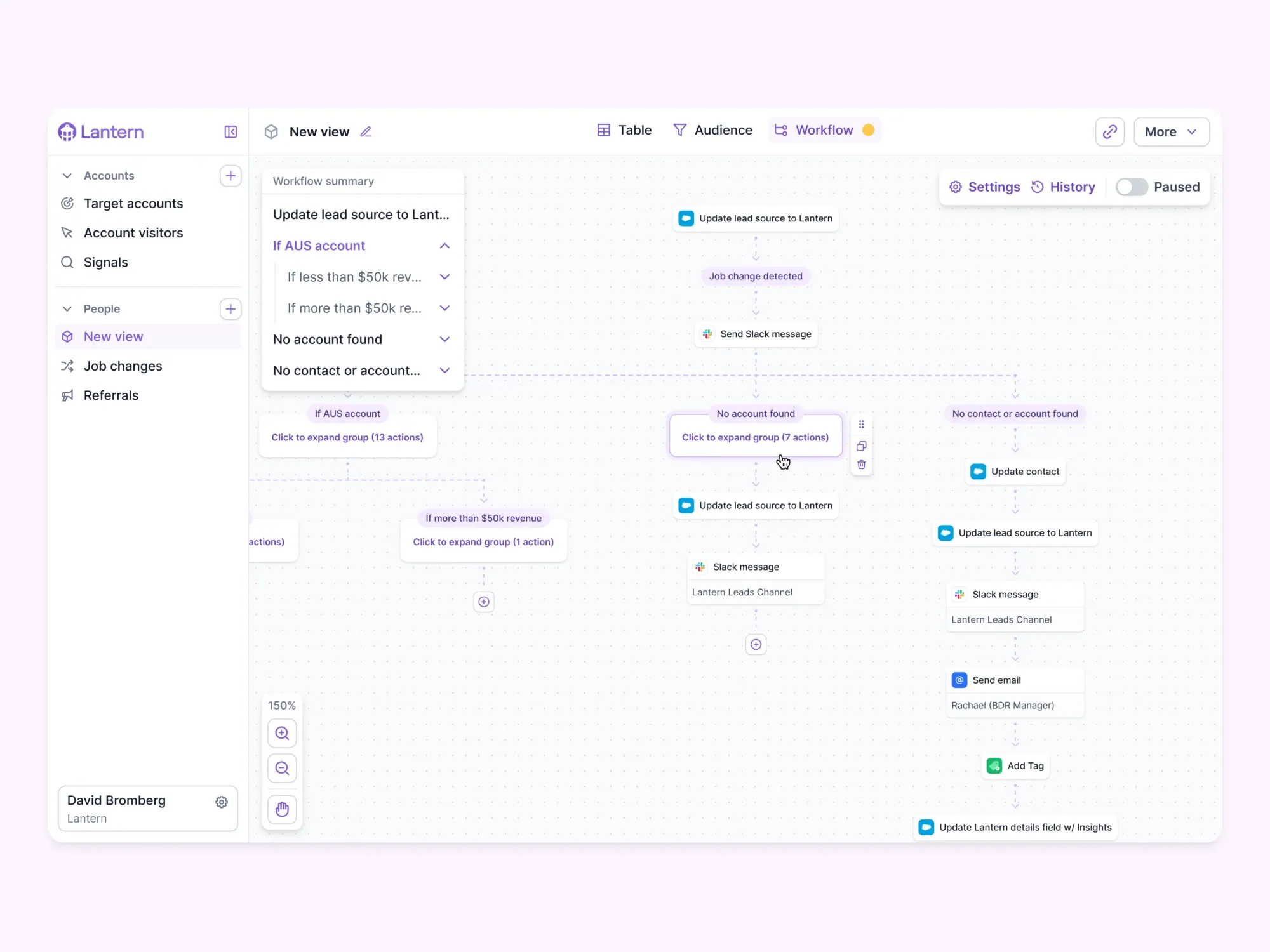
Do visual workflow builders still make sense for AI agents?
For a very small group, yes. For everyone else, no.
In October 2025, LangChain’s CEO wrote that the world doesn’t need yet another workflow builder: they are still not easy for non-technical people to use, and once a workflow gets complex, which happens quickly, it turns into a mess of nodes and edges. I agree, and I’d go further. Even technical people would rather have the AI build it. I design these tools and I know how they work, and I still don’t want to connect and set one up by hand.
We are in the age of talking to our software and expecting it to act. Everyone is under pressure, and nobody has time to tinker. Most startups that keep asking customers to build by hand will slowly die.
What I’d tell a founder building an AI agent product
- Design for the person who wants to switch it on, not the one who wants to build.
- Let people say what they want in a chat, and let the AI ask the follow-up questions.
- Send results where people already are: their inbox, Slack or a spreadsheet.
- Show the steps the AI set up, in plain words, so people can see it understood.
- Keep the full canvas for the few who ask for it.
- Trust your usage data over the demo. What wows in the sales room can sit unused after the sale.